Start with what you know.
Filter, project, sort, and limit with shell-style expressions. Schema-aware suggestions and searchable history help with the next query.
Queries & JavaScript
Use familiar MongoDB shell syntax for a quick lookup, or open Query Builder for a longer script. Your console output, results, and saved queries have a native home on your Mac.
Take a closer look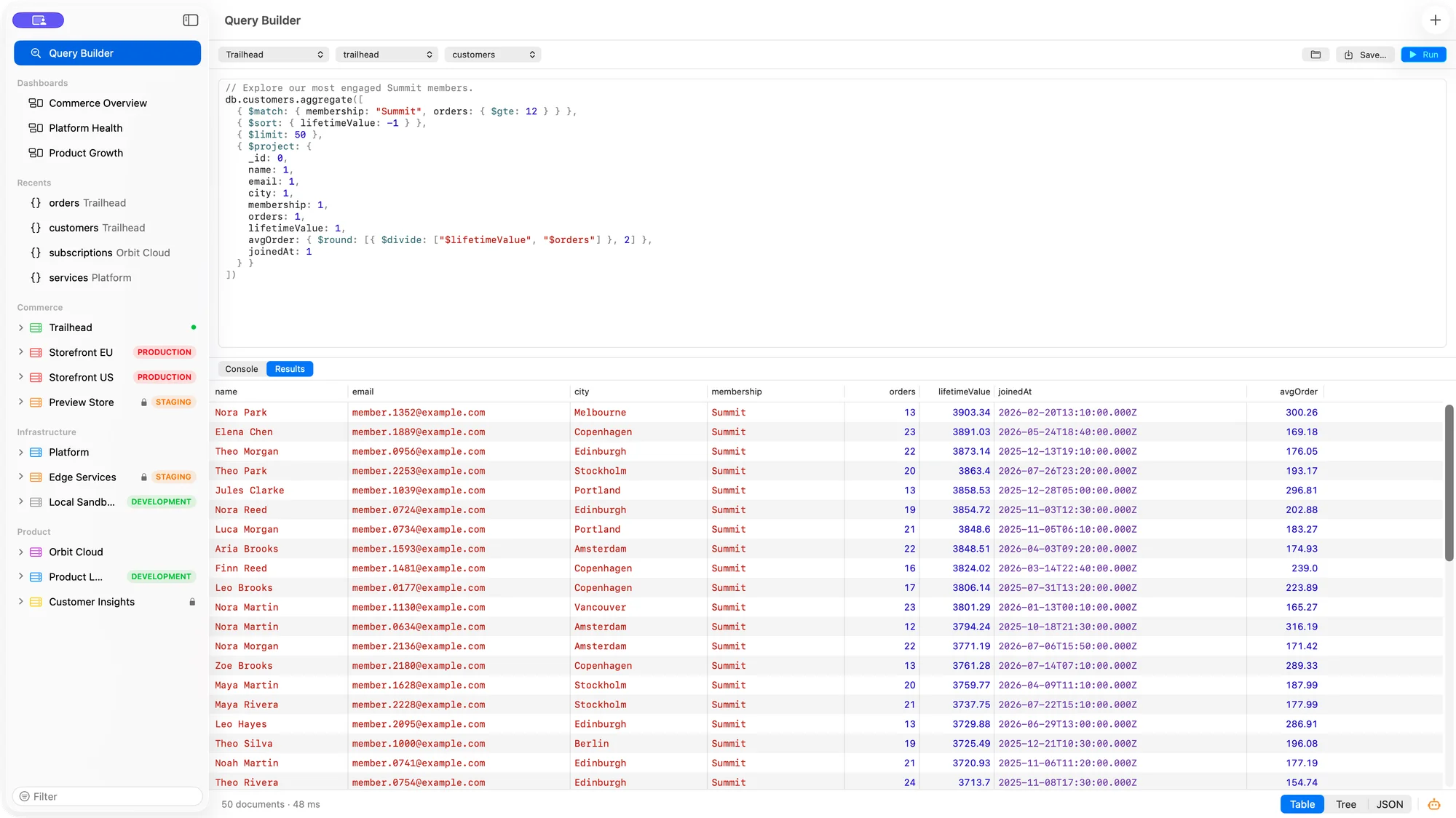
Filter, project, sort, and limit with shell-style expressions. Schema-aware suggestions and searchable history help with the next query.
Run JavaScript with a mongosh-style db API. Console output and the final query results have separate views, so each is easy to read.
Save queries for a collection or make them global. Return to a working answer instead of rebuilding it from scratch.
From first click to useful work
Select a connection, database, and collection for the work at hand.
Execute a single statement or a script, then inspect its console output and results.
Give a reusable query a name and keep it with the collection or in your global library.
A few practical details
No. Bison runs JavaScript through JavaScriptCore with a mongosh-style database API. It does not promise Node.js modules or complete mongosh compatibility.
Yes, on connections that allow writes. Every write in a script requires confirmation; a read-only connection refuses it.